![Sabanto-Horizontal-Orange-on-Transparent-RGB-1080px-05.16.23.png]](https://support.sabantoag.com/hs-fs/hubfs/Sabanto-Horizontal-Orange-on-Transparent-RGB-1080px-05.16.23.png?height=50&name=Sabanto-Horizontal-Orange-on-Transparent-RGB-1080px-05.16.23.png)
Overview
This guide covers the required vMC setup and operating procedures for using a Verdant Robotics Sharpshooter sprayer during autonomous missions. It includes implement configuration, working modes, power requirements, sprayer height setup, and available controls.
For autonomous operation, the implement should be configured as a Liquid Applicator using the Verdant Robotics Configuration, with the attachment point set to Rear Hitch and Implement Control set to None. On Passes Only is the recommended working mode, allowing the system to automatically enable spraying during active mission passes and disable it during inactive passes or transit.
Important: A vOS update is required to use this implement. At this time, the vOS update containing changes for this implement are not released to the general public.
vMC Setup for Autonomous Operations
Creating the Implement
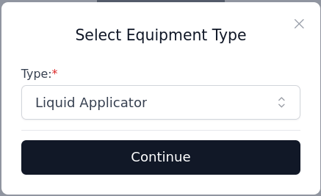
To use the following Verdant implement features, create a new equipment. Select the type as "Liquid Applicator". This is required to see the correct configurations (Implement definition).
Attachment Point & Implement Control
The implement requires the Attachment Point set to Rear hitch (shown in blue box) with Implement Control to set to None (as denoted by red box). This allows the modeling of the implement to reflect its rigidity to the tractor for system spatial modeling. While the implement control of None denotes that the implement will not raise and lower alone, and rather electronic control of the implement will be utilized (enabling/disabling spraying mode).

Configuration - Implement Definition
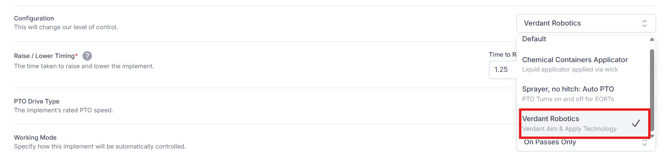
The Verdant Robotics Configuration is required to be selected. This will enable communication between the sprayer and the vehicle. Enabling data transmission between devices during autonomous operations.
Shown below is the definition to be selected in the red box.
Hitch Raise/Lower Times
Adjusting the hitch raise/lower times will determine when in the pass the implement will be commanded to Weeding mode with speed override commands. Through vMC, the green areas are the working areas. Therefore the greater the times associated with raising and lowering, the sooner/longer the implement will be working (spraying enabled).

Working Mode(s)
On Passes Only
On Passes Only is the recommended setting for the working mode. This setting causes the sprayer to enable and disable weeding mode while working autonomously. Below are the states of the sprayer associated with the corresponding mission pass:
- Active (green pass) → Weeding active
- Inactive (red pass) → Weeding not active
- Transit (magenta pass) → Weeding not active
Tip: With On Passes Only selected, when you resume navigation, the vehicle will automatically control the implement to get to the correct Working Position - No need to manually tell it to move prior to resuming navigation.
Remote Control Only
With the Remote Control Only configuration, the implement will only respond to commands from the user via the following control. It will not raise and lower autonomously during the mission like the On-Passes Only setting provides.
Powering the Implement
The Verdant sprayer utilizes an onboard battery system to power the electronics on the implement. This battery must be charged during field operations.
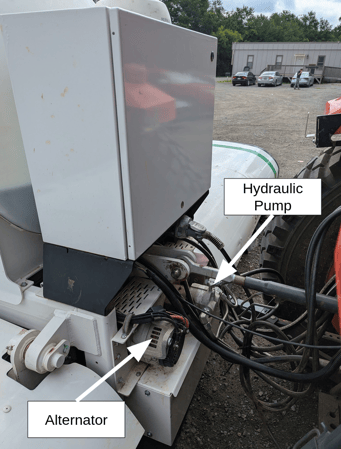
To charge the battery, Verdant utilizes a hydraulically driven generator. Provide the generator with continuous hydraulic flow to keep the battery topped off, or provide the Verdant battery with another source power to keep the battery healthy.
Important: If you are providing continuous hydraulic flow, please verify your vehicle has a hydraulic pump capable of providing continuous flow to the implement.
Setting Sprayer Height with the Hitch Control
Prior to starting operations, the user should manually set the Lowered state desired for operations. To complete this, change the Implement Control to Rear Hitch.

The Verdant Robotics Sharpshooter sprayer desires the sprayer to be 32-34 inches from the ground. To accurately set the lowered height of the system. It is recommended to manually navigate the tractor + implement to a level area. Adjust the hitch height manually with the 3-point hitch lever until the Verdant UI (IPad supplied with verdant system) reports a green check mark for the height on each module (In the example below there were six modules).
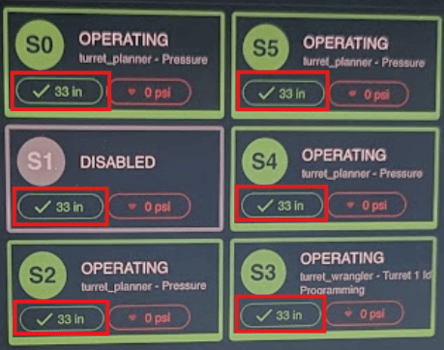
Once all modules are reporting within the operational range (Green check-mark). Hit the “Set Depth” button on vMC via the hitch basic controls tab.
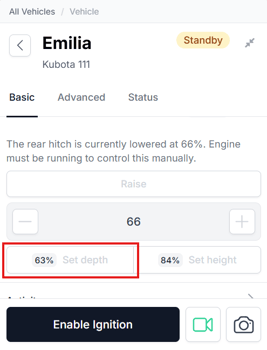
Then return the Implement Control to None for autonomous operations.

Controlling the Implement from vMC
Wing Fold
The folding of the wings is accomplished with independent hydraulic cylinders. When activated, the wings will fold/unfold (very similar to other implements). This can be done manually when in the vehicle.
Note: Currently you are not able to fold the implement remotely from vMC. If you would like this functionality, please contact the product team at product@sabantoag.com
Working Position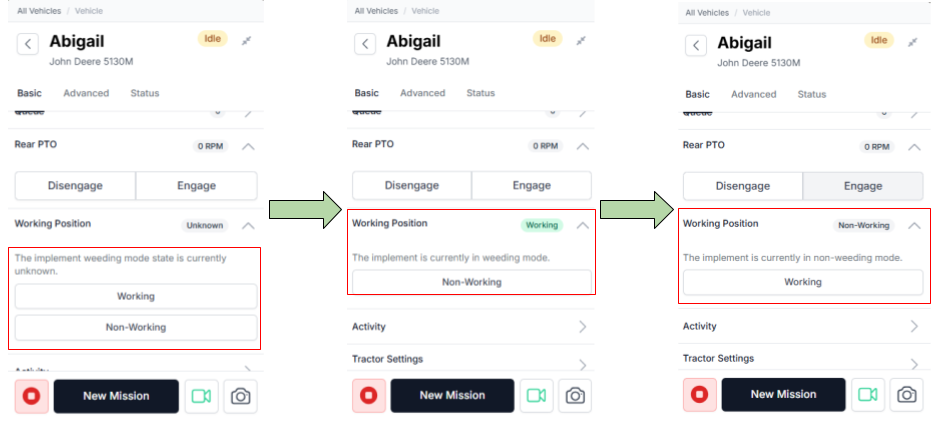
You can see the state of the Working Position control will change during autonomous navigation, to reflect the last state commanded state of the implement. The Working and Non-working commands complete the following actions.
- Working
- Lowers Hitch
- Enable Spray Mode
- Non-working
- Disable Spray Mode