![Sabanto-Horizontal-Orange-on-Transparent-RGB-1080px-05.16.23.png]](https://support.sabantoag.com/hs-fs/hubfs/Sabanto-Horizontal-Orange-on-Transparent-RGB-1080px-05.16.23.png?height=50&name=Sabanto-Horizontal-Orange-on-Transparent-RGB-1080px-05.16.23.png)
Quick Search
- Overview
- Height Limits
- How the Height Settings Work
- How This Impacts You
- Get Your Vehicles Ready Before Updating
- Troubleshooting False Detection Pauses
- FAQ
Overview
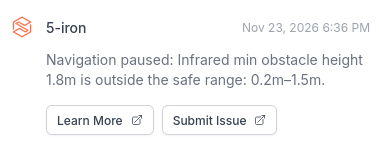
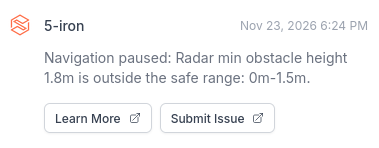
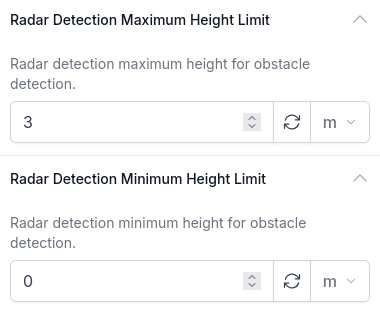
Starting with vOS 1.525.0, the minimum and maximum obstacle detection heights for infrared and radar must stay within safe limits. If a height is set outside these limits, the vehicle pauses, shows which setting is out of range, and won't run autonomously until that setting is corrected.
 |
 |
Get each vehicle running well at safe heights before you update. If heights were raised to work around pauses in the past, those pauses may come back once the heights are inside the limits. Finding and fixing the cause first, while the vehicle is still on your current version, keeps you working through the transition. See "Get your vehicles ready before updating" below.
 |
 |
Height Limits
|
Setting |
Infrared |
Radar
|
|---|---|---|
|
Minimum height |
0.2m to 1.5m (8 in to 4 ft 11 in) |
0m to 1.5m (0 to 4 ft 11 in) |
|
Maximum height |
At least 1m (3 ft 3 in) above the minimum |
At least 1m above the minimum, and at least 1.5m |
|
Default heights |
1m minimum, 3m maximum |
0m minimum, 3m maximum |
How the Height Settings Work
Obstacle detection doesn't look at everything in front of the vehicle. It watches a band of space between the minimum and maximum height. Anything inside that band and in the vehicle's path causes a pause. Anything below the minimum or above the maximum is ignored.
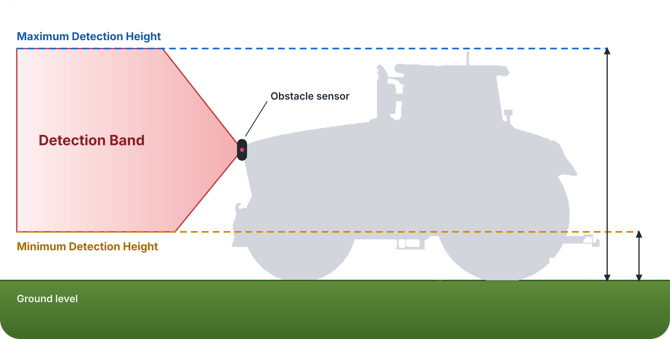
Those settings are a trade-off:
- Lower minimum: the vehicle sees shorter objects, but it's more likely to pause on the ground itself, crop rows, or uneven terrain.
- Higher minimum: fewer ground pauses, but shorter objects are ignored.
- Smaller gap between min and max: a thinner band, so less of an object is inside it.
How This Impacts You
- Heights already inside the limits: nothing changes.
- A height outside the limits: Vehicles on vOS 1.525.0 or greater will pause and shows a message naming the setting, for example "Infrared min obstacle height 1.8m is outside the safe range: 0.2m–1.5m". It won't run autonomously until the setting is back inside the limits.
- Heights recently lowered back into range: pauses that originally led to the raise may come back until their root cause is fixed.
Get Your Vehicles Ready Before Updating
Do this on each vehicle while it's still on its current version before updating to vOS 1.525.0:
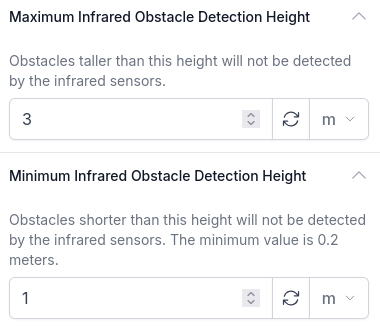
- Check the heights. In vMC, open the vehicle's Advanced Controls and look at the infrared obstacle heights.
- Bring them inside the limits. Use the default minimum and maximum height unless you have a reason not to.
- Run the vehicle in its normal fields at those heights, long enough to see how it behaves.
- Fix what you find. If it pauses more than before, find the cause and use the matching next step in the table below.
- Update vOS once the vehicle runs well at safe heights. If you can't get the system to a stable point without ground pauses, contact your dealer or Sabanto Support before updating, and we'll work through it with you.
Once a vehicle is on vOS 1.525.0, it can't be returned to vOS 1.24.x or earlier remotely, and the heights can't be raised past the limits. That's why it pays to sort out obstacle detection issues first.
Troubleshooting False Detection Pauses
|
Situation |
Next Step |
What to expect |
|---|---|---|
|
Pauses on flat, open ground with nothing in front (the sensors see the ground) |
Keep the default heights. Check the physical sensor mounting angle, then run a sensor calibration if applicable. |
Usually fixes the pauses, with full detection kept. |
|
Trees, poles or other known objects along the path |
Keep the default heights. When the vehicle pauses, confirm the path is clear, then use Safe to Resume in vMC. |
A pause at each object, then you continue safely. |
|
Heights were raised once to get past something and never lowered |
Restore the default heights. Use Safe to Resume for one-off obstacles from now on. |
Back to normal behavior. |
|
Rolling hills |
Keep the default heights and use Safe to Resume when a hill causes a pause. |
Normal behavior for mild hills. A few more pauses on steeper hills, which can be resumed remotely with Safe to Resume. |
|
Still too many pauses at the default |
Contact Sabanto Support, your vehicle may need to have the minimum height adjusted within the limits. A minimum up to 1.5m is allowed. |
Fewer pauses, but objects shorter than the new minimum are ignored. Only raise it as far as you need, and check the field for short obstacles before running. |
|
Tall vegetation |
Contact Sabanto Support before updating so we can work with you on your specific setup. |
|
FAQ
Can I turn the limits off?
No. The limits apply to every vehicle on vOS 1.525.0 and later and cannot be turned off by Sabanto Support.
My vehicle still pauses too much at safe heights. Should I update?
Work through the Troubleshooting False Detection Pauses with your dealer or Sabanto Support first. vOS 1.525.0 requires the heights inside the limits, so the vehicle needs to run well at those heights before you update.
Why does my vehicle pause more after I fixed the heights?
The raised heights were hiding the pauses rather than fixing their cause. Use the Troubleshooting False Detection Pauses table to find and fix that cause.