![Sabanto-Horizontal-Orange-on-Transparent-RGB-1080px-05.16.23.png]](https://support.sabantoag.com/hs-fs/hubfs/Sabanto-Horizontal-Orange-on-Transparent-RGB-1080px-05.16.23.png?height=50&name=Sabanto-Horizontal-Orange-on-Transparent-RGB-1080px-05.16.23.png)
Quick search
Introducing Obstacle Detection Using Radar - Early Release
Visual Awareness Through Onboard Computer Vision (CV) - Early Release
Reduced Pauses From Obstacle Detection on End of Row Turns
Introducing Obstacle Detection Using Radar - Early Release
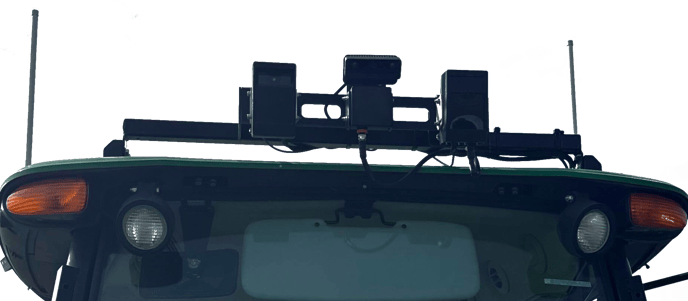
We’re excited to introduce support for a new perception sensor on your Sabanto Autonomy System: Radar. This sensor enhances the system's ability to detect obstacles, particularly metallic objects, in its path of travel.
Important Notes:
-
A hardware update is required to enable radar detection.
-
Radar is not required to operate the system at this time.
-
Access will be limited during the initial rollout as supply is scaled.
Access may be limited during the initial rollout. If you're interested in enabling Radar, please use the Submit Issue form to request a hardware upgrade for your system.
This early release includes a minimal set of radar-enabled features to allow for public testing. While functional, the radar system is still under active development and may occasionally miss certain obstacles.
For more information about the radar sensor, including features, limitations, and current availability, Please Click Here.
Visual Awareness Through Onboard Computer Vision (CV) - Early Release
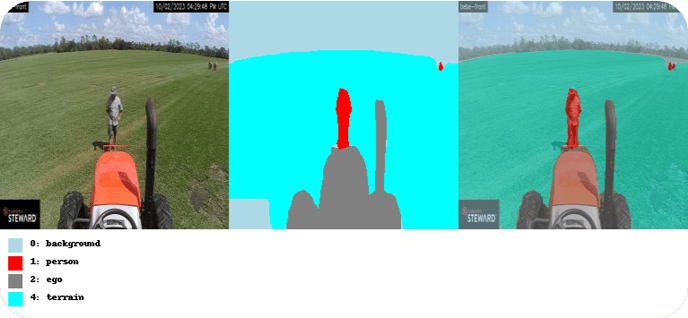
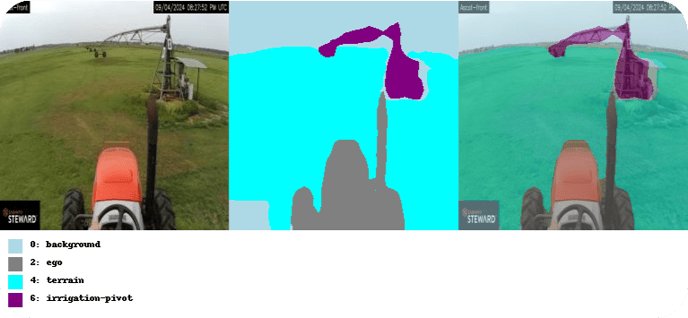
We’re excited to introduce Computer Vision capabilities to your Sabanto Autonomy System. CV uses the vehicle’s front camera to detect real-world obstacles, such as people and irrigation pivots, helping improve safety and autonomy in the field.
Important Notes:
-
A hardware update is required to enable CV for optimal performance.
- CV can be enabled without the updated cameras upon request, though this may reduce detection performance and increase the likelihood of false positives or missed obstacles.
- A camera calibration will need to be performed to enable CV.
-
Click Here for calibration instructions.
-
-
Calibration can be skipped for units that do not have the CV feature turned on.
-
CV detection currently runs only on the front camera. Support for additional cameras is planned in future updates.
Access may be limited during the initial rollout. If you're interested in enabling CV, please use the Submit Issue form to request a hardware upgrade for your system.
This early release includes core functionality and is still under active development. CV is not required to operate your vehicle, but it brings valuable object awareness that will continue improving over time.
For more information about the CV system, including features, limitations, and current availability, please Click Here.
CV detection turns off automatically 30 minutes before sunset and remain off until 30 minutes past sunrise currently.
Below are examples of the front CV camera detecting a person and an irrigation pivot.
Reduced Pauses From Obstacle Detection on End of Row Turns
In vOS 1.17.3 we improved our obstacle detection system to reduce unnecessary vehicle pauses caused by objects outside the field boundary during end-of-row turns for specific vehicle SKUs. Please see the vOS 1.17.3 release notes for more details.
This update adds support for John Deere 5xxxM Cab and John Deere 5xxxM ROPS vehicle SKUs.
Resolved Issues
- Systems randomly navigate off path: We have implemented some changes to reduce the frequency of an issue where the system would experience high CPU usage and at the same time begin to swerve back and forth slightly until the system turned off path.
- Geofence Pauses when Performing the Outermost Headland or Field to Field Transits with a pull-type implement: At times, the system used to pause as a precaution while navigating the outermost headland or during transitions through the tunnel connecting fields on field-to-field transits. We have refined this logic further which prevents unnecessary pauses for pull-type implements. In some corner cases the system may pause when undesired, further additions to come in future updates.
Vehicles navigating with a constant path error may see more frequent pauses when navigating the outermost headland. Please contact support for assistance if the vehicle navigates with a constant path error.
Known Issues
- False pauses from the infrared sensors: Vehicles configured with a non-standard minimum obstacle detection height (below 1 meter) may need to increase the minimum height following this update. Failure to adjust may result in excessive false positives caused by the sensor detecting the ground.
-
The PTO ‘Engage’ button for the Agrivator is active at the wrong times: When a "Device Reset" is performed with an Agrivator attached, or when the Agrivator is assigned to the vehicle while the 3-PT hitch is raised, the PTO "Engage" button becomes enabled. However, when the implement is lowered, the button becomes grayed out.
Workarounds:
- Assign the Sabanto autonomy system to an aeration mission and click ‘Begin navigation’. The system will then control the implement autonomously as needed.
- Lower the 3-PT hitch and perform a 'Device Reset'.
Notification Message Changes
Additions
| New notification message | Short description of why you would see this |
| "Infrared obstacle detection system was powering on." | Navigation was attempted before the IFMs were online or during a power issue that caused the device to brown out due to low voltage. If you see this mid navigation, please contact support. |
| "Infrared obstacle detection system was not receiving the information needed to detect obstacles. Contact support." | The Infrared sensors couldn’t detect obstacles because it wasn’t receiving data, like wheel speed, from the vPFM fast enough. This is often due to an internal issue, so please contact support. |
Modifications
All instances of "Steward™" have been removed. Messages will now display "The Sabanto Autonomy System" instead of "Steward™".