![Sabanto-Horizontal-Orange-on-Transparent-RGB-1080px-05.16.23.png]](https://support.sabantoag.com/hs-fs/hubfs/Sabanto-Horizontal-Orange-on-Transparent-RGB-1080px-05.16.23.png?height=50&name=Sabanto-Horizontal-Orange-on-Transparent-RGB-1080px-05.16.23.png)
Update Note: This update replaces the vehicle's operating system, so it takes longer than a normal update. Do not turn off the vehicle or disconnect power while the update is installing. Once a vehicle is on vOS 1.525.0, it can't be returned to vOS 1.24.x or any earlier releases remotely.
Check your obstacle detection heights before you update. Vehicles with infrared heights outside the new safe limits will pause and won’t run autonomously until they’re corrected. See Safe Limits for Obstacle Detection Heights.
Quick search
- A New, Modern Operating System
- Safe Limits for Obstacle Detection Heights
- Configurable Minimum and Maximum Radar Obstacle Detection Heights
- AVL Hardware Installation Validation
- Resolved Issues
A New, Modern Operating System
vOS 1.525.0 moves every vehicle onto a new, purpose-built operating system, replacing a foundation that had been in place for about six years and clearing out outdated software to get the best performance from your autonomy system. You'll notice:
- Lower processor usage: Average processor usage drops from about 70% to about 50%, giving the system more headroom while it works.
- Safer, faster updates from here on: Future vOS versions install alongside the current one. If an update needs to be rolled back, Sabanto Support can return the vehicle to its previous version in about 30 seconds, without downloading it again.
- Faster, more consistent responses: The vehicle computer now talks to the tractor’s controllers almost instantly. Delays that could slow those messages down are nearly gone, so you should see fewer pauses caused by a part of the system responding late.
- Faster startup: The vPFM starts up and wakes from sleep noticeably faster.
- More reliable connections: Updated cellular, Ethernet, and CAN bus software makes communication between the vehicle, its sensors and actuators, and vMC more dependable.
-
These improvements also address two common pauses:
- “Communication with the steering subsystem was slower than expected.”
- “The Sabanto Autonomy System detected a hardware error with the [rear hitch/service brake].”
Safe Limits for Obstacle Detection Heights
The minimum and maximum obstacle detection heights for infrared and radar now have to stay within safe limits. Heights set outside these limits could leave the space where people and obstacles actually are uncovered, so the vehicle might not pause for something in its path.
If a setting is outside these limits, the vehicle pauses and shows a message naming the setting outside of the safe limit, for example: "Infrared min obstacle height 1.8m is outside the safe range: 0.2m–1.5m."
What to do: Before updating, review your obstacle detection heights in vMC's Advanced Controls and bring any out-of-range values inside the limits. Verify your system is capable of running without excessive pauses with the safe values. Contact your Dealer or Sabanto support if you encounter extra pauses as your OD system may need to be tuned before the update.
| Setting | Infrared | Radar |
| Minimum Height | 0.2m to 1.5m | 0m to 1.5m |
| Maximum Height | At least 1m above the minimum | At least 1m above the minimum, and at least 1.5m |
Configurable Minimum and Maximum Radar Obstacle Detection Heights
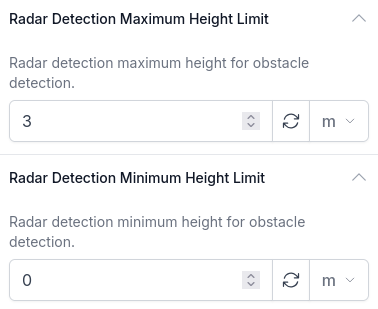
Radar now has its own minimum and maximum detection height settings in vMC's Advanced Controls, the same way infrared does. Use them to set the height range where radar detections count, so radar can be tuned for your vehicle and field conditions.
Radar heights follow the similar safe limits as infrared (see the table above). If a radar height is set outside these limits, the vehicle pauses and tells you which setting needs to change.
AVL Hardware Installation Validation
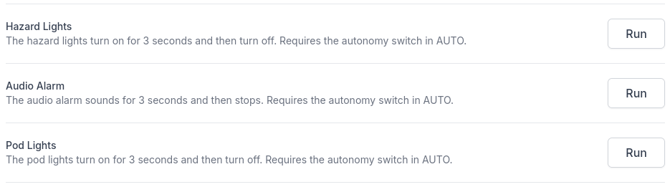
Vehicles with an AVL kit can now have the hardware checked as part of validation in vMC. New validation steps turn on the hazard lights, alarm, or pod lights, so the installer can confirm they work before the vehicle goes into service. These steps only appear when an AVL kit component has been added to the vehicle.
Resolved Issues
- Pauses for Slow Steering Communication - High processor usage could delay communication with the steering system, causing the vehicle to pause with “Communication with the steering subsystem was slower than expected.” The lower processor usage in the new operating system is expected to make these pauses much less frequent.
-
Hitch and Brake Actuators Could Drop Offline During Navigation - The rear hitch or service brake actuator could briefly lose communication during navigation. When this happened, the vehicle turned off its ignition or paused, and reported “The Sabanto Autonomy System detected a hardware error with the rear hitch” (or with the service brake). The faster communication in the new operating system is expected to prevent most of these unexpected shutdowns and pauses.
-
Vehicle Could Keep Navigating After the PTO Shut Off - When a heavy PTO load bogged the engine down, the PTO could turn off automatically and the vehicle would keep navigating without it. The PTO now stays on in this situation, so the vehicle pauses instead of continuing the job without the PTO.
- Boundary Recording Could Get Stuck Until a Restart - If a boundary recording mission was aborted and a new one was sent, the "Begin Recording" option could fail to appear in vMC until the device was restarted. A new boundary recording mission now replaces the old one, and the vehicle clears a stuck recording on its own, so no restart is needed.
-
Hazard Lights and Alarm Could Activate With Switches in Manual - On vehicles with a hazard light and audible alert (AVL) kit, sending a command from vMC while the vehicle's switches were in manual could still set off the hazard lights and alarm. The kit now stays off while the switches are in manual.
-
Drawbar Implement Tracking Improvements - Building on the drawbar implement tracking added in vOS 1.24.0, a trailing implement's drawbar angle no longer starts out incorrect when the system starts up, and the system better predicts where a trailing implement will travel during turns, helping to reduce geofence pauses.
-
Vehicle Configuration Could Be Overwritten When Adding a Component - In some cases, adding a new component in vMC could overwrite the setup of an existing one. This is now fixed.